What Do I Wear Today?
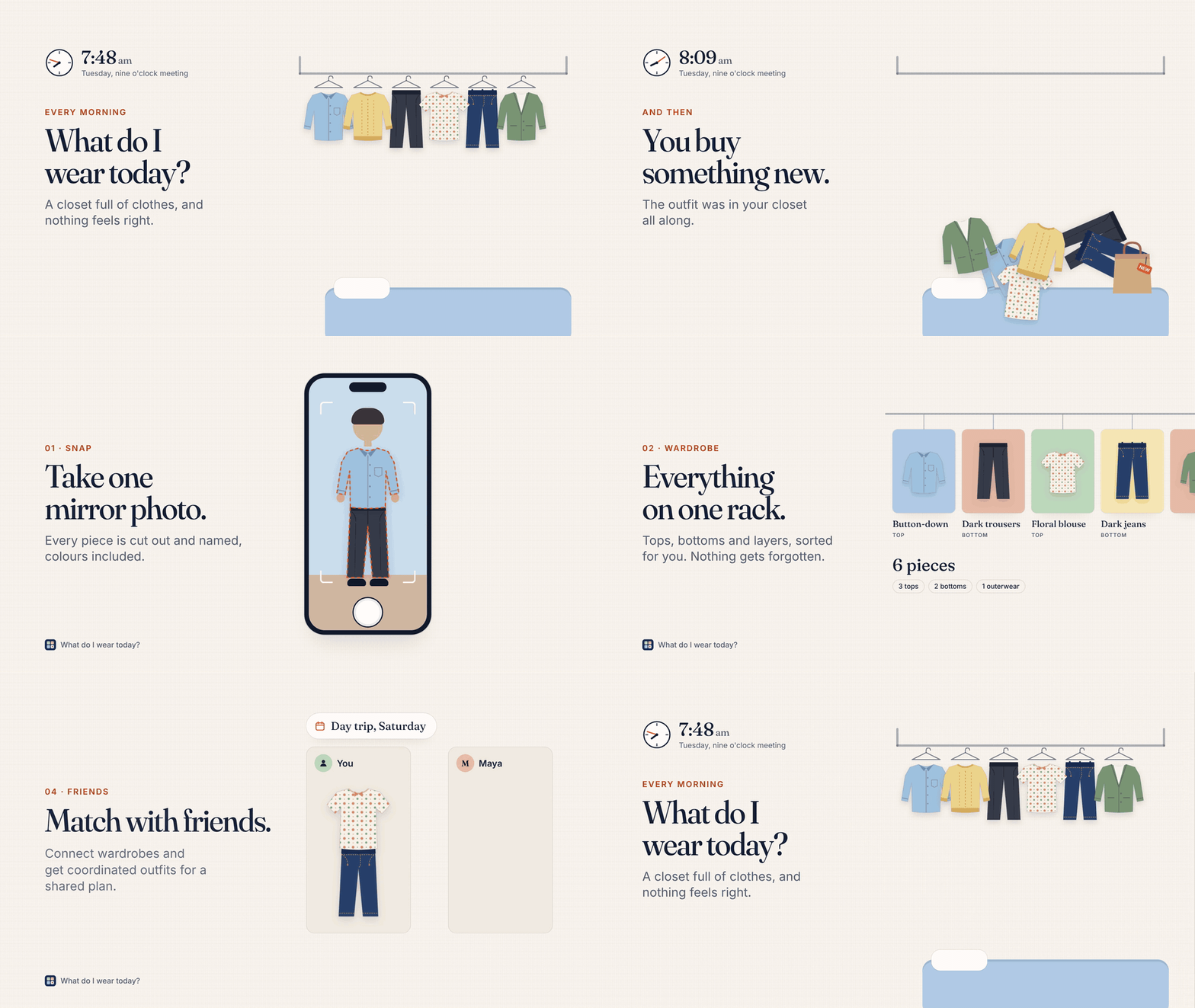
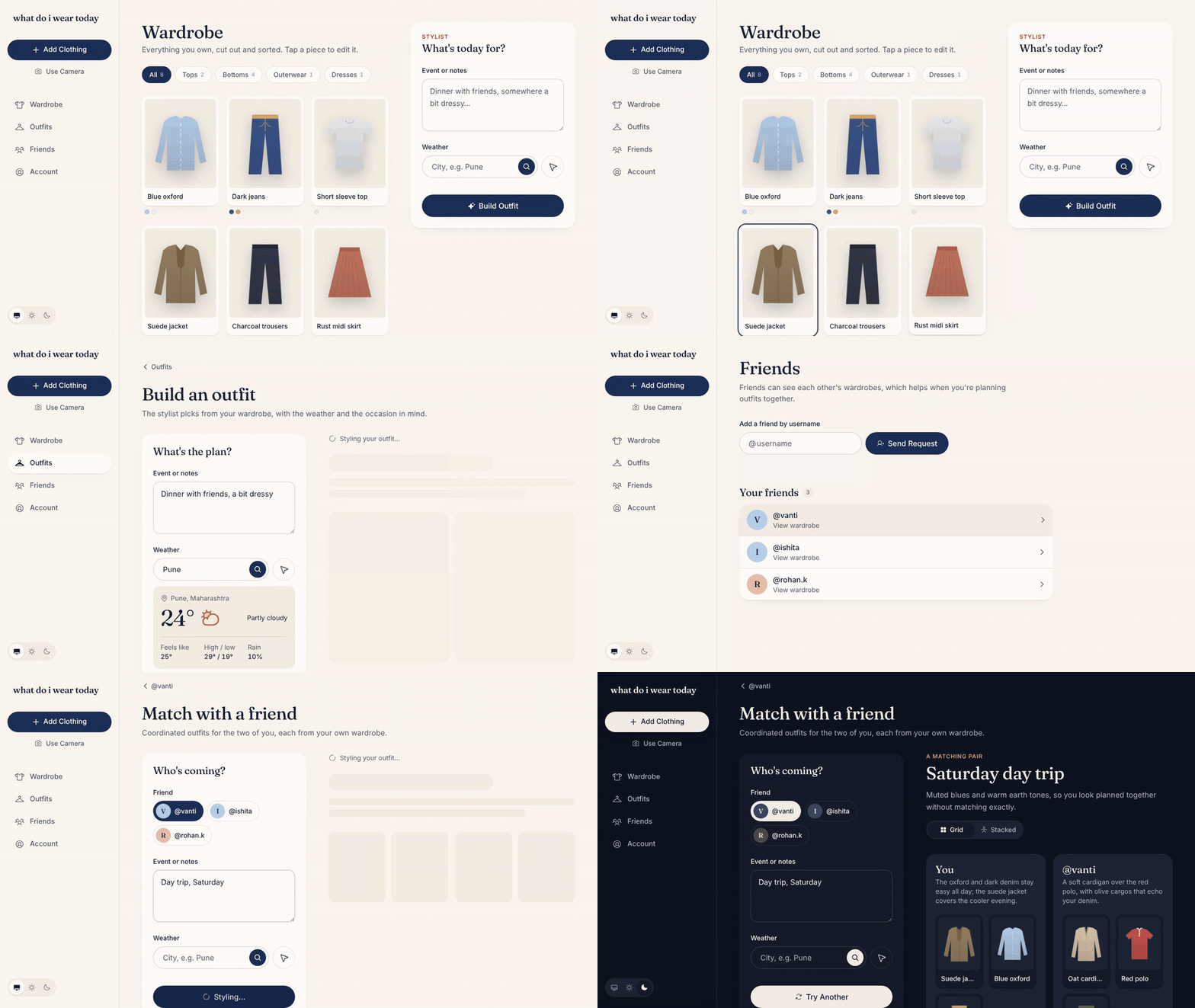
Ever spent way too long deciding what to wear? Same. What Do I Wear Today? turns your wardrobe into a digital one and uses AI to help you build outfits based on your clothes, the weather, and what you're doing. Try it out here!
The Problem
Demo
Architecture
The project is split into frontend/ and backend/ directories splitting the deployment for both between Vercel (frontend) and Huggingface Spaces via Docker (backend).
The complete working is demonstrated in the flowchart below:
flowchart TB
    %% ───────── Client ─────────
    subgraph Client["Browser"]
        UI["Next.js pages<br/>/ · /login · /signup<br/>/wardrobe · /outfits · /outfits/new · /outfits/match<br/>/friends · /friends/[username] · /account<br/>/status · /fourtysevencode (secret)"]
        CAM["Camera / file upload"]
        TS["Cloudflare Turnstile widget"]
    end

    CF["Cloudflare proxy<br/>wardrobe.ronakbuilds.tech"]

    %% ───────── Vercel ─────────
    subgraph Vercel["Vercel · Next.js 16 (frontend/)"]
        PROXY["proxy.ts<br/>redirects signed-out users away from<br/>/wardrobe /outfits /friends /account"]

        subgraph Server["Server Components + Server Actions"]
            AUTH["(auth)/actions<br/>signup · login · logout"]
            WACT["wardrobe/actions<br/>rename · remove garment · remove colour"]
            FACT["friends actions<br/>request · accept · decline"]
            OACT["outfits/actions<br/>save · delete outfit"]
            ACCT["account actions<br/>change username"]
            ADMIN["fourtysevencode/actions<br/>ADMIN_PASSWORD → wdiwt_admin cookie"]
        end

        subgraph Routes["Route Handlers (app/api)"]
            RG["POST /api/garments<br/>photo → segment → store"]
            RIMG["GET /api/garments/[id]/image<br/>owner/friend check → 302 signed URL"]
            RW["GET /api/weather"]
            RO["POST /api/outfits"]
            RM["POST /api/outfits/match"]
        end

        subgraph Lib["lib/"]
            SESS["session.ts<br/>iron-session cookie wdiwt_session"]
            DAL["dal.ts<br/>getCurrentUser · requireUser"]
            USERS["users.ts · bcrypt"]
            GARM["garments.ts"]
            FRI["friends.ts"]
            OUT["outfits.ts"]
            STOR["storage.ts<br/>S3 client"]
            API["api.ts<br/>backend client + X-API-Token"]
            TURN["turnstile.ts<br/>siteverify"]
        end
    end

    %% ───────── HF Space ─────────
    subgraph HF["Hugging Face Space · FastAPI (backend/) · Docker :7860"]
        H["GET /health"]
        SEG["POST /segment<br/>Removes background & extracts colors"]
        MAT["POST /match<br/>AI outfit matching engine"]
    end

    %% ───────── External Services ─────────
    subgraph External["External Infrastructures"]
        DB[("PostgreSQL Database")]
        S3[("S3 Object Storage")]
        WAPI["OpenWeatherMap API"]
    end

    %% ───────── Connections / Interactions ─────────
    UI --> CF
    CF --> PROXY
    PROXY --> Server
    PROXY --> Routes

    Routes & Server --> Lib
    TURN --> TS

    RG --> SEG
    RM --> MAT
    STOR --> S3
    RW --> WAPI

    USERS & GARM & FRI & OUT --> DB
API Reference
Base URL: https://fourtysevencode-what-do-i-wear-today.hf.space
| Method | Path | Auth | Description |
|---|---|---|---|
| GET | /health |
none | Service status and uptime |
| POST | /segment |
token | Cut garments out of a photo and detect colours |
| GET | /weather |
none | Current weather and today's forecast (?q= or ?lat=&lon=) |
| POST | /outfit |
token | Pick one outfit from a wardrobe (Gemini) |
| POST | /outfit/match |
token | Coordinated outfits for two people (Gemini) |
"token" means the endpoint needs the X-API-Token header when the server has API_TOKEN set.
POST /segment
Segments a photo of an outfit into separate garments using a YOLO ONNX model. Each garment comes back as a transparent PNG with its label, how confident the model is, and its main colours.
Headers: X-API-Token (when enabled)
Body: multipart/form-data
| Field | Type | Required | Description |
|---|---|---|---|
image |
file | yes | The photo (JPEG, PNG, etc.) |
Example
curl -X POST "$BASE_URL/segment" \
  -H "X-API-Token: $API_TOKEN" \
  -F "[email protected]"
Response 200
{
  "count": 2,
  "items": [
    {
      "label": "shirt",
      "confidence": 0.912,
      "colors": [
        { "name": "navy", "hex": "#1f2a44", "percentage": 71.4 },
        { "name": "white", "hex": "#f2f2f0", "percentage": 22.0 }
      ],
      "image": "<base64-encoded PNG>"
    }
  ]
}
colorsholds up to 3 colours, largest share first. They're found with k-means clustering in Lab colour space and named against a fashion palette.imageis a base64 PNG cut out to the garment's mask.
Errors
| Status | When |
|---|---|
| 400 | The upload couldn't be decoded as an image |
| 401 | Missing or wrong API token |
| 422 | No image field in the form |
| 500 | The segmentation pipeline failed |
Running locally
Prerequisites
- Python 3.11
- Node.js 20+
- The model file at
models/weights.onnx(it isn't in git) - A Neon Postgres database, a private Backblaze B2 bucket and a Gemini API key
Backend (FastAPI)
From the repo root, create a virtual environment and install the dependencies:
python3.11 -m venv .venv
source .venv/bin/activate
pip install torch torchvision --index-url https://download.pytorch.org/whl/cpu
pip install -r backend/requirements.txt
Create a
.envfile in the repo root:GEMINI_API_KEY=your-gemini-key # Optional: when set, the frontend must send the same value API_TOKEN=Load
.envand start the server. Run it from insidebackend/, becauseapp.pyimportsservices.*:set -a && source .env && set +a cd backend uvicorn app:app --reload --port 8000
The API is now at http://localhost:8000. FastAPI's interactive docs are at /docs.
Docker alternative: build and run the same image the Space uses.
docker build -t what-do-i-wear-today-api .
docker run -p 7860:7860 --env-file .env what-do-i-wear-today-api
Frontend (Next.js)
Install the dependencies:
cd frontend
npm install
Create
frontend/.env.local:# Point at your local backend (defaults to the HF Space) API_URL=http://localhost:8000 API_TOKEN= DATABASE_URL=postgres://... SESSION_PASSWORD=at-least-32-random-characters B2_KEY_ID= BLAZE_B2_APP_KEY= B2_BUCKET= B2_ENDPOINT=https://s3.<region>.backblazeb2.com ADMIN_PASSWORD= # Cloudflare Turnstile test keys (always pass) NEXT_PUBLIC_TURNSTILE_SITE_KEY=1x00000000000000000000AA TURNSTILE_SECRET_KEY=1x0000000000000000000000000000000AACreate the tables and seed the test accounts (
test/test47andtest2/test47):npm run db:migrate npm run db:seedStart the dev server:
npm run dev
Open http://localhost:3000. The /status page checks whether the backend is reachable.
Model
Garments are found by a YOLO26s-seg instance segmentation model (Ultralytics), exported to ONNX (models/weights.onnx, 640×640 input) and run on CPU with ONNX Runtime.
Each detected mask is cut out into a transparent PNG, then its colours are found with k-means clustering in Lab colour space.
It detects 13 clothing classes:
| long sleeve top | short sleeve top | long sleeve outwear | short sleeve outwear |
| long sleeve dress | short sleeve dress | sling dress | vest dress |
| trousers | shorts | skirt | vest |
| sling |
Results
Trained for 82 epochs.
| Metric | Value |
|---|---|
| mAP@50 | ~74% |
| mAP@50:95 | ~63% |
| F1 (at 27% confidence) | 72.9% |
| Precision | 73.7% |
| Recall | 74.8% |
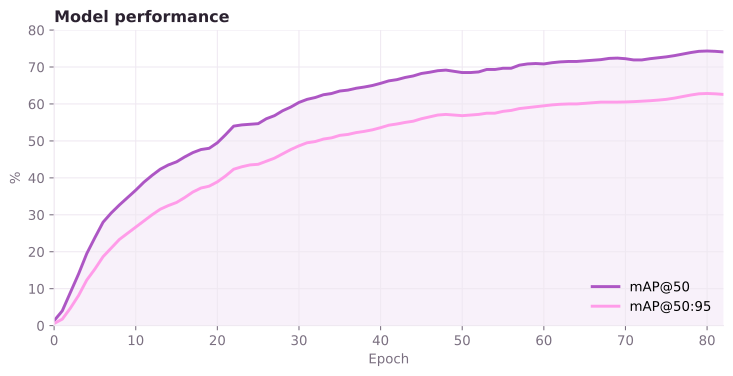
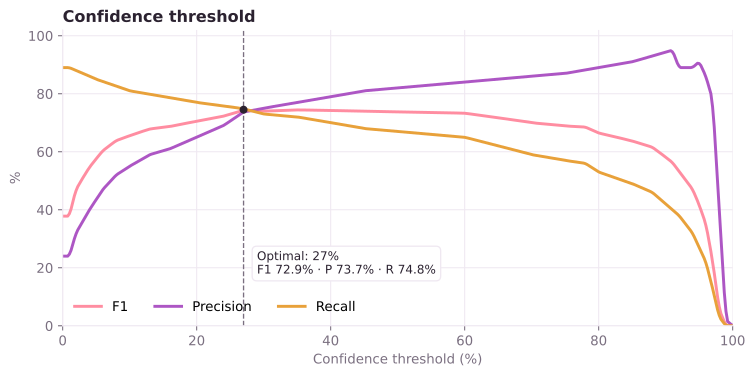
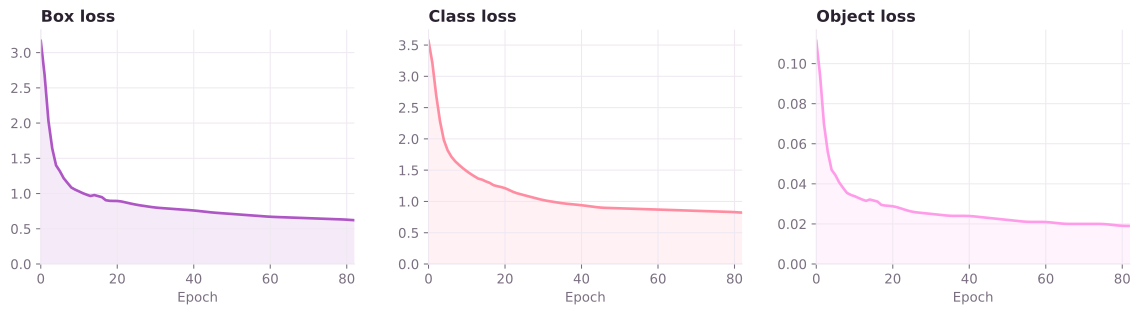
Charts are redrawn from the Roboflow training report (docs/model/charts.py), so the curves are close traces, not exact values.
Dataset
Trained on Clothes Detection from Roboflow Universe, by project-w297p. Thanks to its authors for making it public.
This project was made with 💗 from fourtysevencode
Shipped to Hack Club Terra 2026